
The detective work, done for you.
We've built 25+ years of recruitment experience into STARselect: recruitment software for any role, in any industry, anywhere in the world. Whether you're a recruitment agency or an employer, it automates every step: scoring every applicant against your role description, checking the evidence behind their CVs, candidate pre-screens, tailored STAR interviews and fast, automated reference checks, plus LinkedIn market maps and personalised outreach at the simple click of a button.
What STARselect does that others don't
Think of it as a detective on every vacancy: it weighs the evidence, tests the claims and checks for earlier contact.
- It tests the claims, not just the keywords. The evidence check shows how well a CV or LinkedIn profile backs up what it says: what's specific, what's vague and what doesn't add up. It picks out the strongest and weakest claims and writes up to five STAR questions to test the well-backed claims and up to five on the weakest, ready to use in their pre-screen or add to their interview guide. A LinkedIn profile is usually shorter and less detailed than a CV, so STARselect marks a check or score made from one as a guide, to be given less weight.
- It scores applicants on the page you're viewing. Open an applicant in SEEK or an ATS in Chrome or Edge, right-click and press Rank this candidate. They're scored against your role description, with a reason from the CV for each criterion. No ATS to connect.
- Market maps from your own LinkedIn account, graded against your role description. Searches run on the account you connect: standard LinkedIn or LinkedIn Recruiter (including Lite). Everyone who fits the role is graded A, B or C with the evidence and ranked, in STARselect and in an Excel download. A key says what each grade means for the role, and pointing at a grade shows that person's evidence, each line marked by how sure it is, such as On their profile or To confirm. With Recruiter, link the vacancy to one of your projects and add people to its pipeline: the ones you tick, or everyone graded A. Message them from STARselect and they move to Contacted in that pipeline, then to Replied when they answer a message, InMail or email.
- It checks who's been contacted before. Before you reach out, on the market map or in the pipeline, see whether each person has already been contacted, and when: in your own standard LinkedIn, Recruiter and company page inboxes, in emails picked up by Watch my inbox, and in messages anyone on your team sent from STARselect. You see the messages, with a link to your LinkedIn conversations. Anyone contacted from more than one LinkedIn inbox is flagged. Select all leaves out anyone already messaged from STARselect for that vacancy, and messaging one person shows any earlier contact first.
- STAR interview guides built from each person's CV. STAR questions built from each person's CV against the role: new, or chosen from a bank of over 280 by capability and level and adapted to them. Add evidence check questions with a click. Questions it writes or adapts get prompts to dig deeper; your panel gets a scorecard.
- All of the above, in one workspace. Applicant scoring, evidence checks, LinkedIn market maps, follow-ups, pre-screens, interviews, reference checks and applicant tracking, plus Find new clients for recruitment agencies. Professional is A$79 a month per person, or A$69 a month billed yearly, excluding GST.
| What you get | STARselect | Most ATS and recruitment CRMs | Most AI sourcing tools |
|---|---|---|---|
| Shows how well a CV backs up each claim, with STAR questions to test the strongest and weakest | Yes | Not found | Mostly fraud or identity checks |
| Scores an applicant on SEEK or an ATS page with a right-click, with no ATS to connect | Yes | Mostly save the candidate only | Mostly on LinkedIn, or only in ATSs they connect to |
| LinkedIn market map from your own standard LinkedIn or Recruiter account, graded A, B or C against the role description and ranked, in the app and in Excel | Yes | Their own database at most | Graded, but from their own database, not your LinkedIn account |
| Earlier messages across your standard LinkedIn and Recruiter inboxes, flagged if in more than one | Yes | Recruiter InMail only, or a paid add-on or top plan | Recruiter InMail at most |
| STAR interview questions from each CV, with evidence check questions and a scorecard | Yes | Mostly questions for the job; a few suggest some per candidate | Not found |
| Reason from the CV shown for every criterion graded | Yes | Often | Often |
Based on the published features of established recruitment, sourcing, screening and interview products, reviewed in September and October 2026. Features change, so check any product you're comparing.
From role description to hire: how STARselect works
On every vacancy, score each applicant, check the evidence behind the strongest, pre-screen them and interview the best with tailored STAR questions. Map the market on LinkedIn to find more people, reach out and follow up from one inbox, and finish with reference checks. Recruitment agencies can also find new clients.
1Applicant scoring
Add your role description: upload it, or add it from your job advert with the browser extension, and the must-haves, nice-to-haves, employer and location are set up for you. Then drop in CVs, or right-click an applicant in SEEK or a browser-based ATS, with no ATS to connect. You can also score up to 50 people already in your database who match the must-haves.
Each applicant is scored out of 100, with their main strengths and concerns and the evidence from their CV. Every must-have and nice-to-have is marked met, partly met or not. The strongest sit at the top, and someone on your team can mark each score as reviewed. Scoring is strict unless you set CV grading to balanced or relaxed for your workspace. See how it works
2Check the evidence
Take your top-scored candidates and check how well their CV backs up its claims, or their LinkedIn profile if there isn't a CV. STARselect lists what's specific and flags anything vague or inconsistent, overlapping roles and possible duplicates in your database. It then writes up to five STAR questions designed to validate the strongest claims, and up to five on the weakest. Run it from their application, and use its questions in their pre-screen. It works on any CV, with no vacancy needed.
3Pre-screen to interview
Before you call, email or text a pre-screen link, with up to six questions: the evidence check's, questions from the bank, or questions STARselect writes to fit around them. Candidates confirm their answers are their own, without AI, then type or use hands-free voice dictation, with 5 minutes a question, and any text pasted in is marked for you. The answers are scored and summarised for you to read or hear.
You choose who moves on. Write their tailored STAR interview guide (Situation, Task, Action, Result) in one click from the pre-screen results. It leaves out the questions they've already answered, and comes with prompts to dig deeper and a scorecard your panel can print or fill in on screen. Invitations can offer a choice of times for candidates to book themselves, and interviews run in numbered rounds, each with its own date.
4LinkedIn market maps
Connect your standard LinkedIn or LinkedIn Recruiter account and STARselect runs the searches from the role description. A standard account reaches your 1st, 2nd and 3rd-degree network, with filters for location, current job title, industry, past company and connections; Recruiter covers all of LinkedIn. See how many people match before you start. Up to 1,000 people a search are graded A, B or C against the role and ranked, and a repeat run skips anyone already on the map. Use “Add someone you know from LinkedIn” to paste in someone's LinkedIn profile link, and they're graded like everyone else, with the reason the search missed them. For anyone on the map, “Find more like them” searches again from their job title, employers and key terms, to find other people with similar skills that the search missed. With Recruiter, add them to your project's pipeline, and they move to Contacted and Replied as you message them.
Who's already been contactedEarlier messages, linked to your inboxAssigned to other vacanciesExcel download
5Follow-ups, one inbox
Reach out to candidates and clients at the press of a button: personalised LinkedIn messages, or emails from your own mailbox with your signature. Fill in About you and About your agency or company in Settings, and your messages introduce you and your organisation in your own words. Candidates who haven't answered can get an automatic follow-up. Each person shows whether they're 1st, 2nd or 3rd-degree, and STARselect never sends a connection request to someone you're already connected to.
Replies to your emails and LinkedIn messages land in Messages, newest first, with a count of what's new and a card on your Today page. Search by sender or keyword, and everyone you're in touch with has a thread showing what was sent and received. A candidate's CV is saved to their record, and a newer one waits for you to check it before replacing the old. A role description a client sends by email or LinkedIn is kept in Messages and on that person's thread, and becomes a vacancy in one click, with the must-haves and nice-to-haves set up. Turn on Watch my inbox to include candidates' and clients' emails to your own Outlook or Gmail. Unsuccessful applicants get a polite “no” with constructive, evidence-based feedback.
6Reference checks
Fast and automated. Send one at the press of a button or by voice command: referees get a link by email or text and complete a thorough reference inside STARselect, covering their work with the candidate, achievements, leading and managing, work habits and first-hand examples, typed or by hands-free voice dictation. They're asked to reply within three days, the link stays open for seven, and their answers come straight back to the candidate's record. Then move them to Offer in your pipeline and close the vacancy, with the candidate's licences already on record.
If a referee hasn't answered three days after the request, and you've connected a mailbox and have their email address, one reminder goes automatically from your own mailbox, with the same link. It isn't sent if they've already answered, and it's only sent once. Otherwise, the candidate's record prompts you to email, text or copy a reminder.
Hired
Find new clients
Find organisations advertising jobs on LinkedIn right now, by industry, location and company size, or by job titles such as underwriter or financial accountant, with those advertising the most matching roles first. Type engineering and STARselect also offers the related LinkedIn industries, such as construction, mining and utilities. STARselect finds each organisation's job ads, the people named on them, and up to 50 key contacts at each from your LinkedIn network.
Review the list, with anyone already in STARselect marked, and tick the organisations, contacts and job ads you want. One click adds them all: the organisations you want to build a relationship with go under “Clients”, with the contacts and their LinkedIn profiles, and the jobs you ticked become vacancies to follow up. Reach out on LinkedIn at the press of a button, with a connection request and a short note, or a message if you're already connected. Choose your approach, sharing market insight, a polite introduction or mentioning the job they're hiring for, each ready-written for you to tailor. Their replies come straight back into Messages. Only people new to STARselect count towards your allowance of new client contacts.
Talk to STARselect: say what you want, such as open a vacancy, add a must-have or run a LinkedIn search. Licences and registrations recorded on each candidate, with a link to check them on the official register where there is one, and any that have expired or expire within 60 days flagged on Today.
Before they apply: a job seeker compares their CV with the role description for a match rating and what's missing, and has their CV or LinkedIn profile reviewed for vague or unsupported claims. A separate, small product. About STARselect Check
Your data belongs to your organisation, is stored in Australia and is never sold. Everyone in your workspace sees the same vacancies, candidates and history.
Also in STARselect
- Job adverts, shared on LinkedIn. STARselect drafts the advert from your role description, in the style you choose. Once LinkedIn is connected, share it with your network at the press of a button, with an image if you add one.
- How strictly CVs are scored. Strict, balanced or relaxed: choose it once in the CV grading setting and it applies across your whole workspace, including the browser extension.
- The reason behind every score. Each one shows how the candidate matched each requirement, with the evidence from their CV. Someone on your team can mark it as reviewed, so there's a record that a person checked it, and you can print it if a candidate asks why.
- Constructive, evidence-based feedback. A polite “no” that helps each unsuccessful applicant: the must-haves their application didn't show, taken from their score; what came through well in their CV and where to add detail, from their evidence check; and a pointer to STARselect Check, where they can test a CV against a role before applying, with the first 3 free. You choose what to include, and read each email before it goes out.
- Applicant tracking. A pipeline by stage, as a list or a board: see who is where, search by name, title or employer, and move people on one at a time, several at once or by dragging. People from the market map keep their A, B or C grade and its evidence, in the map's order, and anyone already contacted is tagged. Interviews run in numbered rounds, each with its own date, and the Interviews page shows everyone at that stage. A candidate's record shows every job they're on and how far they've progressed, with a button to consider them for another. Candidates, clients and vacancies have search and A to Z letters, and vacancies also sort by the ones you opened most recently, most people in process, most recently contacted or newest first. Long lists open in a window you can drag and keep open as you move around.
- Clients, and organisations you want to build a relationship with. Companies are listed A to Z with their contacts, and you can search them or sort by most open vacancies or most recently contacted. Those added through Find new clients are tagged “Building a relationship”, and any that are advertising jobs are tagged Hiring. Import a client's people from another system as an Excel or CSV file. Then email one person, or tick several and send to them all, to check in, follow up after a meeting or after sending a CV, reconnect, discuss a vacancy or arrange a catch-up. Choose a ready-written email or have STARselect write three options in different styles, then make it warmer, shorter or more formal. Each recipient gets their own copy, with their first name and your signature. Reach the new contacts you find through Find new clients on LinkedIn too, with a connection request and a short note, or a message if you're already connected, ready-written for you to tailor: sharing market insight, a polite introduction, or, where they're advertising, “I saw you're hiring”, naming the role. You can also call or text anyone from your phone.
- About you, and about your agency or company. Add a one-line intro and up to three key points about you, drafted from your CV or LinkedIn profile, and the same for your agency or company, drafted from its website. STARselect uses them to introduce you and your organisation in the messages, emails and job adverts it writes for you. Colleagues don't see About you, except in the messages you send; your organisation's details are shared with your team.
- Talk to STARselect. Press Talk to me and say or type what you want: open a vacancy or a candidate, add must-haves or search keywords, move someone to the next stage or run a LinkedIn search.
- Licences and registrations. Site safety cards, trade and plant licences and professional registrations, recorded on each candidate and suggested from their CV. Check each one on the official register where there's one, record who checked it, and see what's expired or about to expire on your Today page.
Your data belongs to your organisation. We don't look at your records unless you ask us to help with something or the law requires it, and we never sell your data or use it for any other purpose. Try it free for 30 days: see what the trial includes below.
Let STARselect review your applications, right inside your job board or browser-based ATS.
Add STARselect to Chrome or Edge and use it on SEEK and in browser-based ATSs, with no ATS to connect and no switching between systems.
- Open your job advert. Click the STARselect icon in your toolbar and press Add role description to STARselect. It reads the advert and sets up the vacancy: the must-haves, the nice-to-haves and the employer.
- Open an applicant. Right-click the page and choose Rank this page with STARselect. It reads their CV and scores them against the role description straight away.
- See who to call first. Every applicant is scored against the must-haves, with the reason for each rating, and added to your STARselect pipeline, ready for their evidence check and pre-screen.
- Check the evidence. For your top-scored applicants, right-click and choose Evidence check with STARselect. See how well the CV or LinkedIn profile backs up what it says, with questions to test its well-backed claims and its weakest. It works on any CV, with no vacancy needed.
Included in the free trial. For Chrome and Edge on a computer.
How to install it
- Download the extension. Open your Downloads folder, right-click starselect-extension.zip and choose Extract All, then Extract. This makes a folder called starselect-extension. (On a Mac, double-click the file instead.)
- In Chrome, type chrome://extensions in the address bar (in Edge, edge://extensions) and turn on Developer mode.
- Click Load unpacked, open your Downloads folder, click once on starselect-extension to highlight it, then press Select Folder.
- Click the puzzle-piece icon in the toolbar and pin STARselect. Sign in to STARselect in the same browser, and you're ready.
See who you've already spoken to, before you reach out.
Every market map you download shows, next to each name, whether they've already been contacted: in your connected LinkedIn inboxes, in emails picked up by your Watch my inbox, and in messages anyone on your team sent from STARselect, checked again as you download. Choose the grades to include and leave out anyone marked Not a fit. Point at a Yes to see the message history, newest first, and click it to open the conversation on LinkedIn. Anyone contacted from more than one LinkedIn inbox is shown in red, so you can avoid approaching anyone twice.
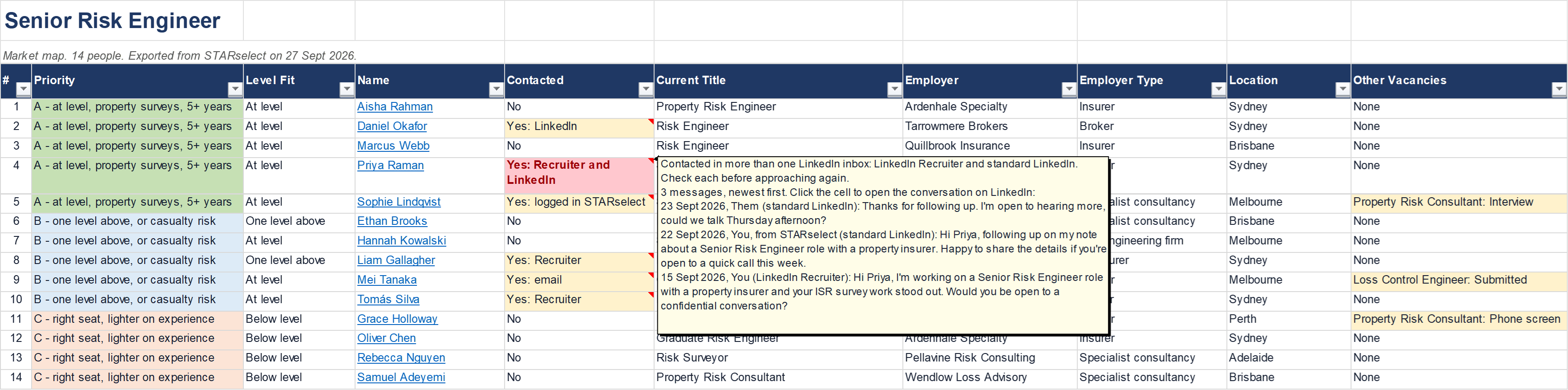
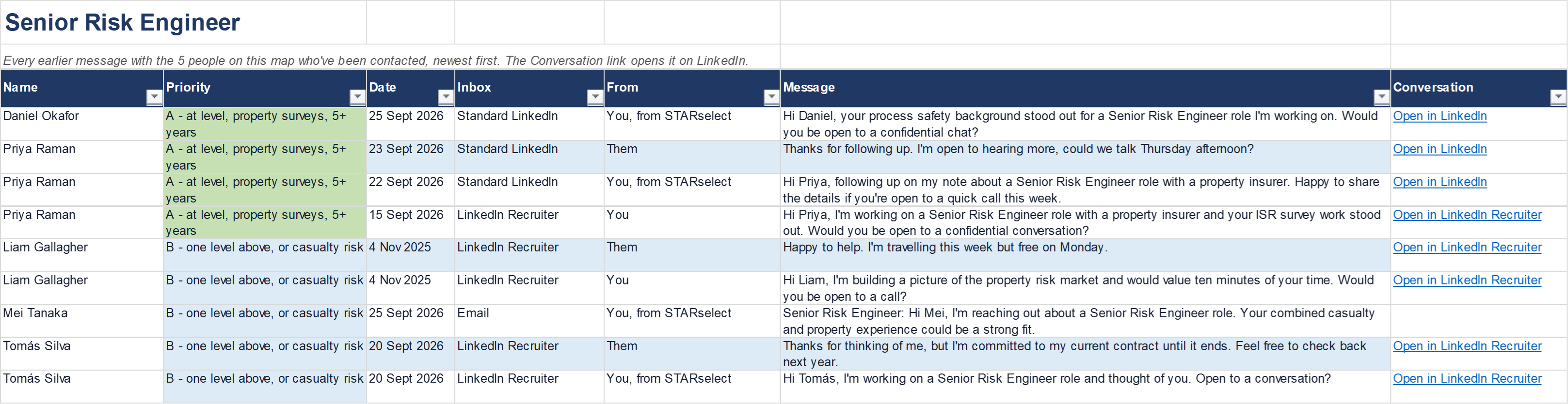
An example with made-up people and employers.
Try STARselect free for 30 days.
Create your STARselect account below and your trial starts straight away, with nothing to pay and no card details needed. For 30 days you get every feature and Professional's allowances, with fewer pre-screens, reference checks and new client contacts. What's left is shown as you go and in Settings. Here's exactly what's included.
Included in your free trial
- 30 days, just for you. Your trial starts when your account is set up and runs for 30 days. Each free trial is for one person: if a colleague would like to try STARselect too, they can start their own. Choose a plan when you're ready to work as a team, and a colleague who joins can bring their trial work with them.
- 40 tailored interview guides. In one click from a candidate's record or pre-screen results, STARselect writes a complete guide for that person: STAR questions (Situation, Task, Action, Result) based on what their CV claims, prompts to dig deeper, and a scorecard your panel can print or fill in on screen.
- 500 CVs ranked or scored against your role description. Let the browser extension review applications right inside your job board or browser-based ATS, or drop in the CVs you've received. Each one is scored against the role's must-haves and nice-to-haves, with the reason for every rating.
- 1,000 LinkedIn profiles added to market maps. Connect your LinkedIn or LinkedIn Recruiter account and STARselect finds candidates, grades those who fit A, B or C against the role and builds a ranked list you can download to Excel, showing who you've already contacted. Anyone who doesn't fit the role, or is already on the map, isn't counted.
- Find new clients, up to 50 new client contacts. For recruitment agencies: STARselect finds organisations advertising jobs on LinkedIn, by industry, place and size, and the people to contact at each. You see everything it finds, and you can add up to 50 of those contacts to STARselect during your trial. Searching doesn't count; only the new contacts you add.
- 20 pre-screens and 6 reference checks. Send candidates a link to answer a few questions before you call, and referees a link to complete a thorough reference, typed or by hands-free voice dictation.
- Messaging candidates. Personalised LinkedIn messages or emails from your own mailbox, automatic follow-ups, and a polite “no” with constructive feedback for unsuccessful applicants. Replies, and CVs sent back, come straight to their record. You connect your own LinkedIn and mailbox, as long as that LinkedIn account hasn't been used for another free trial.
- Interview invitations. Invitations sent from your own mailbox with a calendar file attached, including a choice of times candidates can book themselves.
- 3 exports. Download your candidate list, pipeline or hires tracker up to 3 times in total during your trial. Market maps, interview guides and scorecards don't count. A full backup of your workspace is available once you choose a plan.
- The rest of the app. Evidence checks of CVs and LinkedIn profiles, licences and registrations with expiry reminders, a record of how each score was reached, voice commands, the question library and ready-made interview templates. Your vacancies, pipeline and candidate records have no limits.
When your trial ends
Everything you've saved stays in your account for 90 days, so you can pick up where you left off by choosing a plan. STARselect's AI features (writing interview guides, scoring CVs and searching LinkedIn) and candidate messaging pause until you choose a plan. If you connected your LinkedIn or email during the trial, STARselect disconnects them when the trial ends, unless you've already subscribed. The accounts themselves aren't affected, and you can connect them again at any time on a paid plan.
Plans and prices
| Free trial | Professional | Professional Plus | |
|---|---|---|---|
| Price | Free for 30 daysNo card needed | A$79 a month per personor A$69 a month billed yearly | A$119 a month per personor A$109 a month billed yearly |
| People | Just you | As many as you need | As many as you need |
| Interview guides | 40 | 40 | 100 |
| CVs ranked or scored | 500 | 500 | 1,250 |
| LinkedIn profiles added to market maps | 1,000 | 1,000 | 2,500 |
| New client contactsFor recruitment agencies | 50 | 250 | 750 |
| Pre-screens | 20 | 30 | 60 |
| Reference checks | 6 | 10 | 20 |
| AI requestsSuch as writing a job ad, a message or an email. Scoring CVs, adding people to market maps and writing interview guides don't use them. | 200 | 200 | 300 |
| Exports of candidate lists | 3 | No limit | No limit |
| Full workspace backup | Once you choose a plan | ✓ | ✓ |
| LinkedIn and email connected | ✓Your LinkedIn and email | ✓Each person on your plan connects their own | ✓Each person on your plan connects their own |
| Top up with extra packs | Once you choose a plan | ✓ | ✓ |
| Every feature | ✓ | ✓ | ✓ |
The trial's allowances are for the whole 30 days. A plan's allowances are for each month, for each person, and shared across your team. Add people at any time, each at the plan's price; a billing-only owner, such as a finance manager, isn't charged as a person. Prices in AUD, excluding GST.
Extra packs
| Pack | What you get | Price |
|---|---|---|
| Extra interview guides | 10 interview guides | A$10 |
| Extra CV rankings | 100 CVs ranked or scored | A$12 |
| Extra LinkedIn profiles | 500 LinkedIn profiles added to market maps | A$12 |
| Extra client contactsFor recruitment agencies | 250 new client contacts | A$19 |
| Extra pre-screens | 20 pre-screens | A$12 |
| Extra reference checks | 10 reference checks | A$10 |
| Extra AI requests | 200 AI requests, such as writing a job ad, a message or an email | A$15 |
| Everything pack for employers | One of each of the six packs above, apart from client contactsA$71 bought separately | A$59Save A$12 |
| Everything pack for agencies | One of each of the seven packs above, including 250 new client contactsA$90 bought separately | A$74Save A$16 |
Top up in the app whenever you're running low. Only the workspace owner buys packs: anyone else can ask the owner in the app, and the owner approves it by email or in Settings. Anything left from a pack carries over to the next month; your plan's monthly allowance does not. Prices in AUD, excluding GST.
Your data
Your data belongs to your organisation. We don't look at your records unless you ask us to help with something or the law requires it: our admin tools show accounts and usage, not your candidates, vacancies or CVs. We never sell your data, and we don't use it for any other purpose, including ConstructEng Australia's own recruitment business. STARselect is operated by ConstructEng Australia Pty Ltd. What you enter is stored on servers provided by a third-party host in Australia, on our behalf, and is used only to run STARselect for you. Some features, like the AI and connected LinkedIn and email accounts, use specialist service providers, some of them overseas. See the Privacy Policy for details.
STARselect is not affiliated with, endorsed by or sponsored by LinkedIn. LinkedIn is a trade mark of LinkedIn Corporation.
Start your free trial
Create your STARselect account in one step: your name, work email, a password, your organisation's name and whether you're a recruitment agency or an employer. Your 30-day trial starts as soon as your account is created.
Start my free trial →Ask us about STARselect.
Send us your question, or ask for a walkthrough for your team. You'll get an email to confirm we've received it, and we'll reply to you directly.